ShipScreen
The complete iOS & Android build and publish assistant
Your perfect companion for shipping mobile apps. Build, run, and iterate locally on iOS and Android, then package release artifacts ready for the App Store and Google Play. Handles bundle IDs, signing config, version bumps, screenshot generation in every required size, and the device-frame marketing assets — all from a single native desktop app.
Free for personal, educational and non-profit use, on one app: the first project you open. Commercial use — including a solo consultant on client work — requires ShipScreen Pro, which also covers any number of apps. Every build is produced by release CI and served from mayorana.ch.
The macOS build is signed with an Apple Developer ID and notarized, so it opens with a normal double-click.
Or install from a terminal
curl -fsSL https://mayorana.ch/install/shipscreen.sh | shirm https://mayorana.ch/install/shipscreen.ps1 | iex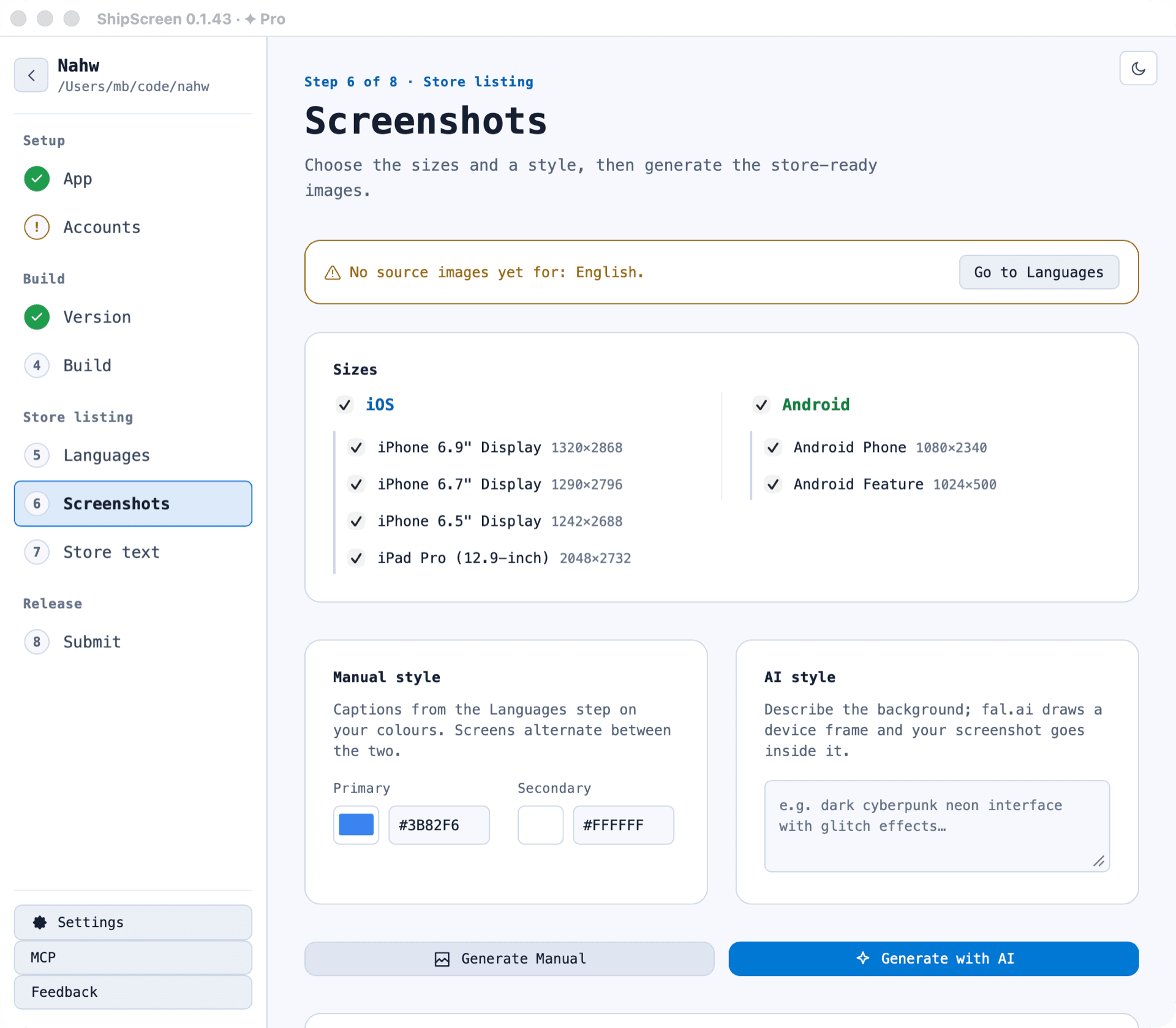
How ShipScreen compares
Only the things ShipScreen is strong at are listed. The others do plenty it doesn't — this table is about why you would pick it.
| Feature | ShipScreen | fastlane | Web screenshot makers | Xcode + Play Console |
|---|---|---|---|---|
| Framed store screenshots in every required size, per language | frameit, configured in files | |||
| AI-generated device frames and backgrounds, one theme per set | Fixed templates | |||
| Listing and screenshots uploaded to both stores through their APIs | Download, then upload by hand | By hand, store by store | ||
| Version bump, signed build and submission for review in one app | Ruby lanes you write | Separate tools per store | ||
| Provisioning profile checked against the app before the build | Managed by match, not pre-checked | Fails at build time | ||
| Desktop GUI, no Ruby or scripts to maintain | ||||
| Screenshots and store publishing from macOS, Windows or Linux | macOS and Linux; Windows unofficial | In the browser | Xcode is macOS only |
Compared in October 2026 from each product's public documentation. Something out of date? Tell us
Use it from Claude Code or Codex
Run this line in a terminal to add ShipScreen's MCP server to Claude Code for every project. Then ask Claude about it in chat.
claude mcp add shipscreen --scope user -- "/Applications/ShipScreen.app/Contents/MacOS/shipscreen" mcpclaude mcp add shipscreen --scope user -- "%LOCALAPPDATA%\Programs\ShipScreen\shipscreen.exe" mcpclaude mcp add shipscreen --scope user -- "/usr/bin/shipscreen" mcpThe paths are where the installer puts ShipScreen; on Linux, where you extracted the archive. Installed elsewhere? The MCP button in ShipScreen gives the lines with its actual path, and the text for Claude Desktop. In PowerShell, write $env:LOCALAPPDATA instead of %LOCALAPPDATA%.
ShipScreen Pro comes with a monthly plan, which also brings AI credits. Subscribe with your email; your licence number is shown right after and sent by email.
Overview
Shipping a mobile app release is a long list of small, exacting steps: bump the version, get the signing config right, produce a screenshot in each size the store demands, wrap them in device frames so the listing does not look amateur, then package the artifact the store will accept.
ShipScreen does that list from one native desktop app, for both platforms, without the usual pile of shell scripts and half-remembered Xcode settings.
The screenshot generation alone is the part most teams do by hand every release, in every required size, for both stores.
What it does
Local build and run
Build, run and iterate on iOS and Android from one place, driving Xcode and Gradle underneath.
Release packaging
Produces the artifacts the App Store and Google Play accept, rather than leaving you to work out which archive format each one wants this year.
Bundle IDs, signing and version bumps
The configuration that breaks a release at the last minute, handled as part of the flow instead of remembered per release.
Store screenshots in every size
Generates the screenshot set both stores require, at every required resolution, from one capture.
Assets uploaded, not just generated
Device-framed screenshots go straight into App Store Connect and Google Play through their APIs, landing in the correct display type and screenshot set rather than waiting in a folder for someone to drag in.
What it costs your agent
Connecting ShipScreen to Claude Code, Claude Desktop or Codex costs tokens of the agent's own model, not AI credits of ShipScreen: the server's instructions are in every conversation, the tool definitions once they are loaded, and every reply stays in the conversation and is read again on each later turn, mostly from the prompt cache at a tenth of the price.
| What the agent reads | Tokens |
|---|---|
| Server instructions, in every conversation | ≈ 320 |
| Every tool definition (Claude Code loads one when it is first used; Claude Desktop, all of them in every chat) | ≈ 2,600 |
Reply to list_projects | ≈ 140 |
Reply to get_project | ≈ 1,100 |
Measured on ShipScreen 0.1.53, 2026-10-31, on a typical project. Replies grow with what there is to report: a longer list, a bigger diff. Counts are estimates to about 15%.
Requirements
- macOS on Apple Silicon for iOS builds; Windows or Linux x86_64 for Android-only use
- Xcode, for building and packaging iOS
- The Android SDK and Gradle, for Android
- An App Store Connect or Google Play account to publish the artifacts
Built with
Rust · Dioxus · Xcode · Gradle · image · imageproc
What's new
Version 0.1.75, released 24 November 2026. ShipScreen ships often; every version and what it changed is listed on the release notes page.
Read the release notesLicence
Source-available under the PolyForm Noncommercial License 1.0.0: free for personal use, learning, research and hobby projects, and for charities, schools, universities and government institutions, on one app with every feature (you can swap which app is the free one). Commercial use — including a solo consultant on client work and an employee using it at their job — requires ShipScreen Pro, which also covers any number of apps. Pro is the commercial licence: there is nothing else to buy.
Source
The source is public and readable. Fork it and rebrand it — the name and logo are trademarks and are not covered by the licence.
View on GitHubQuestions
Can I use it for Android only?
Yes. The Android path does not need macOS. iOS builds do, because Xcode does.
Does it upload to the stores for me?
Yes, for store assets: it talks to the App Store Connect and Google Play Developer APIs directly to upload screenshots into the right display types and sets. You supply the API credentials.
Questions about this tool?
Ask about a commercial licence for your team, report an issue, or tell us what is missing. We read every message.
Get in touch