PublishKit
AI-powered blog post manager with queue-to-publish workflow
Write, generate, and schedule blog posts from your desktop. AI drafting via Mistral or Claude, markdown editor with live preview, queue-to-publish flow, weekly auto-publish, and multi-language support (FR/EN) — all in one native app.
Free for personal, educational and non-profit use. Commercial use — including a solo consultant on client work — requires a licence. Every build is produced by release CI and served from mayorana.ch.
The macOS build is signed with an Apple Developer ID and notarized, so it opens with a normal double-click.
Or install from a terminal
curl -fsSL https://mayorana.ch/install/publishkit.sh | shirm https://mayorana.ch/install/publishkit.ps1 | iex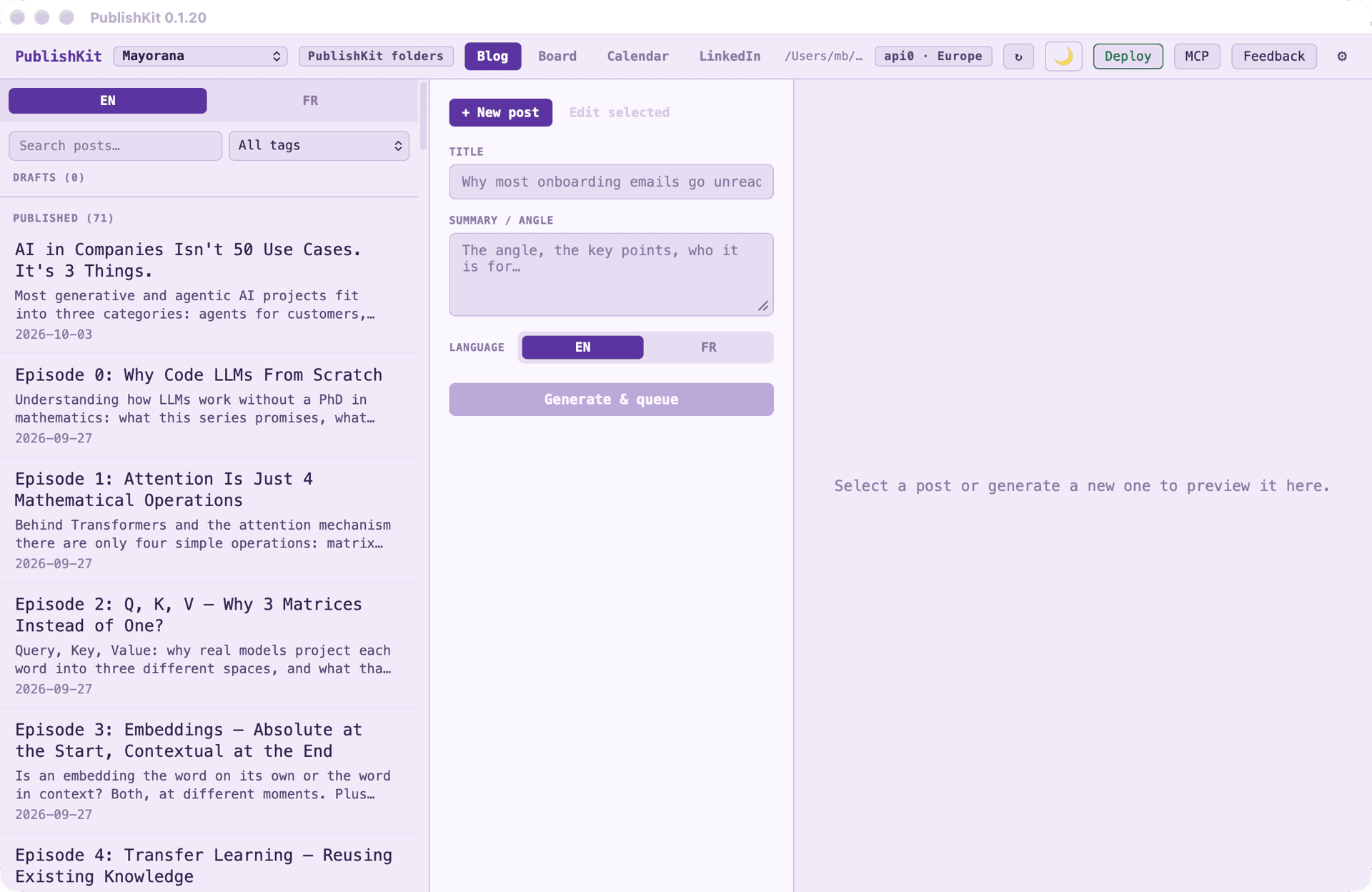
How PublishKit compares
Only the things PublishKit is strong at are listed. The others do plenty it doesn't — this table is about why you would pick it.
| Feature | PublishKit | WordPress | Ghost | Obsidian + git |
|---|---|---|---|---|
| Posts stay markdown files in your own repository | ||||
| A publish queue that drains on a weekly cadence | Schedule each post by date | Schedule each post by date | ||
| AI first draft inside the editor (Mistral or Claude) | Through a plugin | Through a community plugin | ||
| French and English versions of a post managed together | WPML or Polylang plugin |
Compared in October 2026 from each product's public documentation. Something out of date? Tell us
Use it from Claude Code or Codex
Run this line in a terminal to add PublishKit's MCP server to Claude Code for every project. Then ask Claude about it in chat.
claude mcp add publishkit --scope user -- "/Applications/PublishKit.app/Contents/MacOS/publishkit" mcpclaude mcp add publishkit --scope user -- "%LOCALAPPDATA%\Programs\Blog Manager\publishkit.exe" mcpclaude mcp add publishkit --scope user -- "$HOME/publishkit-linux-x86_64/publishkit" mcpThe paths are where the installer puts PublishKit; on Linux, where you extracted the archive. Installed elsewhere? The MCP button in PublishKit gives the lines with its actual path, and the text for Claude Desktop. In PowerShell, write $env:LOCALAPPDATA instead of %LOCALAPPDATA%.
Overview
A blog that publishes on a schedule needs two things a text editor does not give you: somewhere for finished-but-unpublished posts to wait, and something that publishes them when the day comes.
PublishKit is a native desktop app built around that queue. You draft in markdown with a live preview, optionally with an AI model doing the first pass, then move posts into a queue that publishes on its own schedule.
It handles both language versions of a post as part of the same flow, which is what makes a bilingual blog sustainable rather than something you keep meaning to catch up on.
What it does
Queue-to-publish flow
Finished posts wait in a queue instead of in a folder you forget about, and go out on the schedule you set.
Weekly auto-publish
Set the cadence once and the queue drains on its own. A week you do not write is a week the queue covers for you.
AI drafting
First drafts via Mistral or Claude, in the editor rather than in a separate chat window you copy out of.
Markdown editor with live preview
Write in markdown and see the rendered result as you type, including the code blocks that usually break in generic editors.
French and English side by side
Both locale versions of a post are managed together, so a translation does not drift a month behind the original.
What it costs your agent
Connecting PublishKit to Claude Code, Claude Desktop or Codex costs tokens of the agent's own model, not AI credits of PublishKit: the server's instructions are in every conversation, the tool definitions once they are loaded, and every reply stays in the conversation and is read again on each later turn, mostly from the prompt cache at a tenth of the price.
| What the agent reads | Tokens |
|---|---|
| Server instructions, in every conversation | ≈ 640 |
| Every tool definition (Claude Code loads one when it is first used; Claude Desktop, all of them in every chat) | ≈ 6,350 |
Reply to project | ≈ 490 |
Reply to list_posts | ≈ 2,300 |
Reply to get_post | ≈ 4,200 |
Measured on PublishKit 0.1.40, 2026-10-31, on a typical project. Replies grow with what there is to report: a longer list, a bigger diff. Counts are estimates to about 15%.
Requirements
- macOS on Apple Silicon, Windows, or Linux x86_64
- A blog project laid out as content/{en,fr}/{queue,blog} — the app is asked for the project root on first launch
- Node.js 18 or newer: publishing shells out to Node to rebuild the site index (the Windows installer and the macOS setup script handle this)
- A Mistral or Anthropic API key, if you want AI drafting — pasted in Settings or read from MISTRAL_API_KEY / ANTHROPIC_API_KEY
Built with
Rust · Dioxus · Mistral / Claude · Markdown
What's new
Version 0.1.68, released 24 November 2026. PublishKit ships often; every version and what it changed is listed on the release notes page.
Read the release notesLicence
Source-available under the PolyForm Noncommercial License 1.0.0: free for personal use, learning, research and hobby projects, and for charities, schools, universities and government institutions. Companies using it for work buy a licence.
Source
The source is public and readable. Fork it and rebrand it — the name and logo are trademarks and are not covered by the licence.
View on GitHubQuestions
Does it lock my content into a proprietary format?
No. Posts are markdown files with frontmatter on your own disk. Publishing moves a file from the queue folder to the blog folder, sets its status and date, and rebuilds the index. The app manages the files; it does not own them.
Can I use it without the AI features?
Yes. The editor, queue and scheduler work with no model configured.
Which models does it use?
Mistral or Claude, chosen in Settings.
Questions about this tool?
Ask about a commercial licence for your team, report an issue, or tell us what is missing. We read every message.
Get in touch